What is an IP-Based PA System and How Does It Work?
An
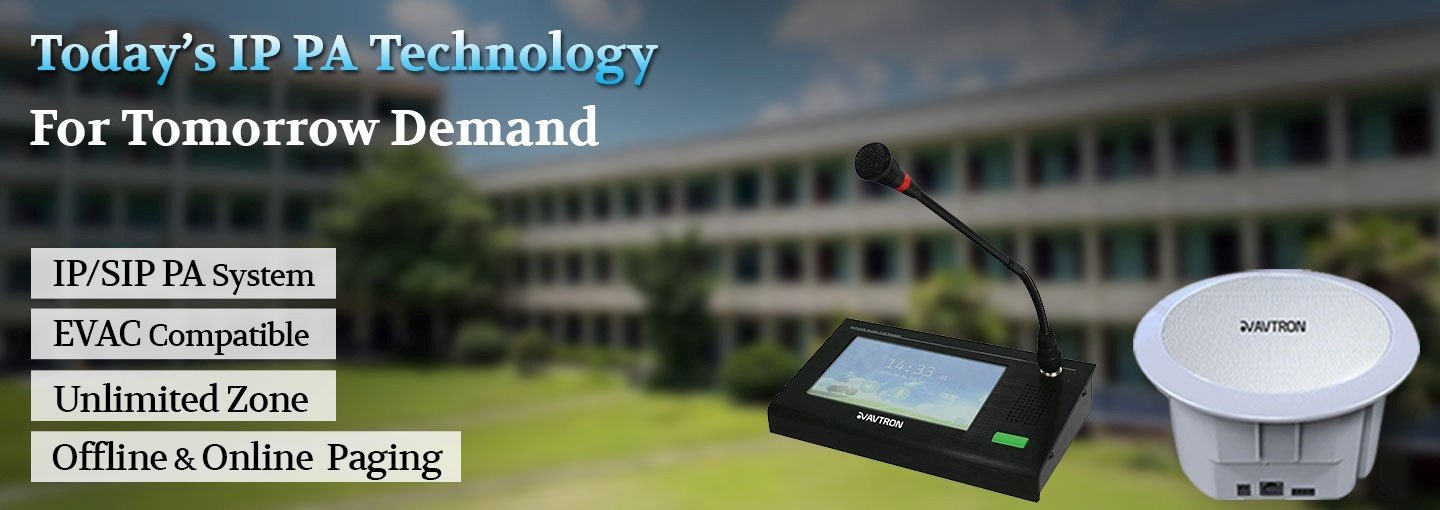
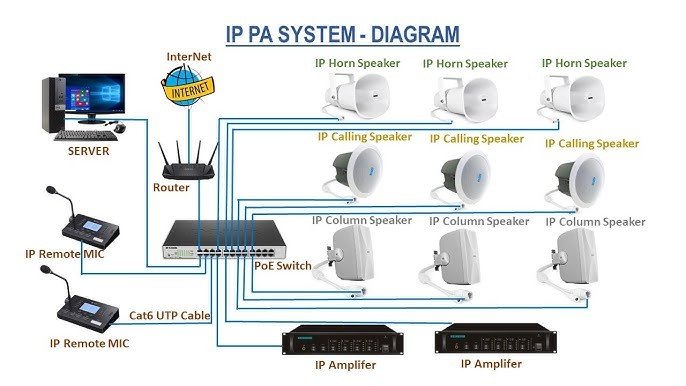
IP-based PA (public address) system sends announcements as digital audio over a network, unlike traditional analog PA. In simple terms, network speakers connect to switches just like computers. IP speakers receive audio data over Ethernet (often using Power-over-Ethernet) and play it, with built-in amps and DSP. This means one cable carries both power and sound to each speaker. An IP PA system typically includes microphones or audio sources, a central controller (paging console or server), Ethernet switches (and PoE), amplifiers, and IP speakers.For example, AVTRON describes its IP PA as a system with
“IP speakers, IP paging microphones and software” for zone announcements over an IP LAN/WAN. Because the audio is packetized, it stays clear over long distances and can be controlled centrally. You just plug IP speakers into the network and they appear in the PA software. There’s no need to run separate audio wiring everywhere, making installation simpler than with wired analog systems.

Why Use an IP PA System in Malls and Industries?
IP PA systems are ideal for large venues like shopping malls, airports, and factories. They bring
flexibility, quality and control not possible with old-school PA. Key benefits include:
- Scalable & Flexible – New speakers just join the network. No new wiring. In a big mall, adding another zone is as easy as plugging in an IP speaker. This flexibility is great when a mall expands or a factory adds buildings.
- Centralized Control & Monitoring – You can manage all zones remotely. Administrators can trigger any announcement, update music, or test speakers from one console. Each device reports its status back, so you know instantly if a speaker fails. Even across multiple stores, management stays unified.
- High Audio Quality – Digital signals deliver clear, consistent sound. Background music and ads in a mall sound crisp, and emergency alerts cut through noise without static. IP setups often include digital signal processing (DSP) to equalize and optimize audio.
- Advanced Messaging – You can schedule BGM and announcements by time or event. For instance, playing welcoming messages on opening, promos at noon, or special reminders on holidays. Zones are easy – tell shoppers in just the food court about a sale, or remind staff in a warehouse area about a break.
- Emergency Integration – Safety is improved. IP PA easily links with fire alarms, door sensors or intercoms. In a fire, the system can automatically broadcast evacuation instructions with high priority. Malls can install one-touch emergency intercoms at key points so people can call for help instantly. These features ensure clear instructions and fast response when it matters.
In practical terms, businesses see real benefits. For example, a national retail chain can manage all store speakers from headquarters – broadcasting promotions or closing-time bells across locations with a click. Factories use rugged IP horn speakers to warn workers at specific conveyor belts while machines run, ensuring safety without needing extra amplifiers. Even schools can schedule bells and lockdown alerts to precise buildings over the network. Overall, IP PA makes it easy to reach the right people at the right time, and even ties into security systems if needed.

Analog vs IP PA Systems: Key Differences
Choosing between an
analog PA and an
IP PA comes down to scale and features. Here are the main differences:
| Feature | Analog PA System | IP PA System |
| Audio Quality | Good, but quality drops over long cable runs | High-definition audio with minimal loss |
| Scalability | Limited – adding zones requires extra wiring & amplifiers | Highly scalable – add zones via network |
| Cabling Requirements | Heavy cabling (speaker wires, loop lines) | Single Ethernet cable for power + audio (PoE) |
| Installation Cost | Lower upfront cost | Higher initial investment |
| Maintenance | Manual checking; faults hard to trace | Centralized monitoring & auto alerts |
| Control & Zoning | Basic zoning; changes require rewiring | Advanced grouping, dynamic zones, instant updates |
| Integration | Limited integration with CCTV/Fire | Fully integrates with CCTV, Fire, Access Control |
| Emergency Announcements | Works but limited automation | Automated alerts, text-to-speech, priority messaging |
| Remote Access | Not possible | Full remote management via software/app |
| Audio Routing | Fixed wiring path | Flexible routing over LAN/WAN |
| Reliability | Good but cable-dependent | High – network redundancy options |
| Use Case Suitability | Small offices, schools, warehouses | Malls, industries, airports, hospitals, smart buildings |
| Future Proofing | Low | Very high (IoT-ready) |
How Can IP PA Systems Enhance Security and Emergency Communication?
IP PA isn’t just for music and announcements; it’s a
critical tool for safety. By design, IP systems integrate with emergency infrastructure:
- Alarm Integration: IP PA can link with fire, gas or intrusion alarms. When an alarm triggers, the system instantly broadcasts pre-recorded evacuation instructions throughout the facility. The digital network ensures even distant speakers get the message without delay or distortion.
- One-Touch Alerts: In high-risk areas, you can install IP intercom or emergency call terminals. Pressing one button sends a live page or message and may stream video to security staff. For example, a mall could place an intercom at an entrance. Someone needing help presses it and an announcement calls for security immediately.
- Lockdown & Critical Announcements: In schools or offices, IP PA can disseminate lockdown or shelter-in-place orders across specific zones. Unlike analog bells, these messages can go to exactly the impacted buildings or floors with tailored instructions.
- Redundancy and Monitoring: Network PA systems often include health checks. If a speaker or network link fails, the system alerts the administrator. This means problems can be fixed before an actual emergency. And because IP PA runs on standard IT gear, it can be tied into backup power and network infrastructure easily.
Regulations also favor IP-based voice alarms. For instance, safety standards like
EN 54-16 (Europe) and
NFPA 72 (US) set performance requirements for PA/VA (voice alarm) systems during emergencies. Modern IP PA products are designed to meet these codes. The market data shows stringent fire and safety codes are a big driver for PA system upgrades worldwide. In practice, that means choosing IP PA helps building operators comply with laws and keep people safe.
Example: A university campus replaced its old PA with IP speakers. Now, staff can broadcast real-time campus alerts from any computer, fire drills simulate actual voice instructions, and officers get alerts on handheld devices if an evacuation tone is triggered. This modern approach
greatly improved response time and clarity during drills, compared to the limited buzzer system they had before. (Studies show coordinated emergency paging can cut evacuation times by 30–50%.)

How to Set Up an IP-Based PA System: A Step-by-Step Guide
Getting an IP PA system running involves planning and the right components. Here are the key steps:
- Define Your Needs: Map out the areas to cover and zones needed. Decide if you want separate music channels, which areas need horns or loudspeakers, and where you’ll place microphones or paging stations.
- Gather Components: An IP PA typically includes a paging console/controller (this could be a PC with software or a dedicated unit), network switches (PoE switches for power and data), IP speakers (ceiling, wall, horn, etc.), IP amplifiers (if using analog speakers), and microphones or audio players. According to AVTRON’s guidelines, the core parts are sound sources (mics/CD/streaming), a controller, transmission (network), amplifiers, and speakers.
- Choose Architecture: For small-to-medium systems, a single network paging console with built-in server can manage up to ~30 IP endpoints. Larger sites might use multiple servers or software on PCs. You can also mix: use IP speakers where needed and drive existing analog 70V speakers with IP amplifiers. For example, one design scenario is “IP Amplifier + Analog Speakers,” where the IP device powers and processes audio, but the emitters are old-school horns or bells.
- Install Hardware: Mount speakers in planned locations. Run Ethernet cable from PoE switches to each IP speaker (or amplifier). Connect the network console to the LAN. Ensure switches and core network gear can handle the audio traffic (some systems use VLANs or QoS to prioritize PA audio).
- Configure the System: Assign IP addresses to all devices and register them with the controller software. Define zones and assign which speakers belong to each zone. Upload background music tracks if needed, and program scheduled events (e.g. “play music on Store_1 zone from 9am to 11am”). Also set up emergency priority channels: for instance, page on override to all zones when fire alarm input is triggered.
- Test and Tweak: Before going live, test each zone’s audio level and clarity. Try paging from each microphone. Verify that remote controls (like web or phone interfaces) work. It’s smart to run a fire drill announcement to check coverage and understand the delay (should be near-instant). Make adjustments to volume or speaker placement as needed.
- Train Personnel: Show staff how to use the paging console or software interface. Ensure duty officers know how to trigger emergency messages, change volume, or play recorded alerts. Because it’s software-based, giving multiple admins access (with passwords) is easy.
After installation, maintenance is straightforward. Many IP PA systems include monitoring dashboards that list all speakers and their health. You might see a red warning if one speaker loses power or network connectivity, so you can fix it before it becomes a problem. In short, an IP PA setup is a bit like any network project: plan your layout, hook devices into switches, configure settings, and you’re done – but with powerful software tools at your fingertips.

Why Choose AVTRON for Your PA and Security Solutions?
AVTRON is a leading provider of both
IP and analog PA systems. Whether you need to upgrade to IP or maintain an analog setup, AVTRON offers end-to-end solutions – from speakers and amplifiers to paging consoles and software. Their IP-based PA products include IP speakers, paging microphones and management software, all designed to work over your LAN/WAN. And if you prefer analog, AVTRON supplies 70V amplifiers and conventional speakers too. In every case, AVTRON’s team can help design, install and support the system. This means you get professional guidance on choosing the right mix of equipment (IP vs analog), and on setting it up for your malls, factories, schools or hospitals. With
AVTRON’s solutions in place, you’ll have clear, reliable announcements and alerts under one roof – today’s networks combined with proven audio technology.